
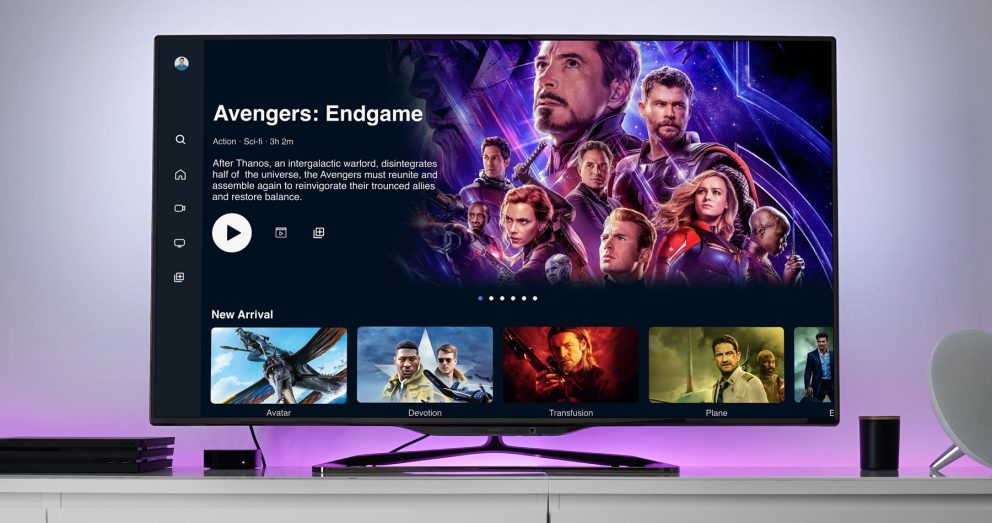
Why Rockstreamer for Android TV Application Development?
Choosing the right partner can make or break your smart TV project. Rockstreamer’s Android TV application development team combines deep Android expertise with TV-first thinking.
Trusted by streaming and TV app clients across the United States, United Kingdom, Canada, UAE, and Bangladesh.
01 · Track Record
Proven Track Record
Shipping Android TV apps for Fortune 500 brands and startups alike.
02 · Standards
Google-Aligned Builds
Strict adherence to Google’s TV design and development guidelines.
03 · Delivery
Agile Delivery
Rapid prototypes, iterative user testing, continuous delivery.
04 · Support
24/7 Support
Ongoing support and maintenance to keep your TV service online and up to date.
Android TV Application Development Services at Rockstreamer
Rockstreamer provides end-to-end Android TV app development and consulting worldwide. Whether you need a custom streaming app, an interactive OTT platform, or a shoppable catalog experience, our team has the expertise.
Environment Setup
Android Studio, SDK Manager, TV system images, AVD creation.
Manifest & Launcher Integration
ACTION_MAIN + CATEGORY_LEANBACK_LAUNCHER, touchscreen feature flags, 64-bit requirements.
TV-Optimized UI/UX
Leanback fragments, Compose for TV, 10-foot UI, safe margins, font sizing.
D-Pad Navigation & Focus
Seamless remote control handling, DPAD events, and default key consumption.
Performance Tuning
Hardware profiling, shallow layouts, optimized image assets, minimal animation lag.
Testing & Deployment
Physical device validation, emulator vs hardware, Play Store publishing, App Bundle submission.
How Rockstreamer’s Android TV App Development Process Works
Our six-step process ensures every project is delivered on time and within budget.
Discovery & Planning
User personas, UX flows, technical requirements.
Design & Prototyping
Wireframes, mockups at 1920×1080, 10-foot UI validation.
Development
Environment setup, manifest wiring, Leanback/Compose implementation.
Testing & QA
D-pad navigation, focus testing, performance profiling.
Deployment
App Bundle packaging, TV screenshot assets, Play Store submission.
Post-Launch Support
Analytics integration, bug fixes, feature enhancements.
Android TV Application Development: A Technical Deep Dive
From SDK setup to Play Store submission — here’s what goes into every Rockstreamer build.
Environment Setup
+
SDK installation & Android Studio configuration
Open Android Studio’s SDK Manager, enable it, and install the Android TV Intel x86 Atom System Image for your target API level. Don’t forget the emulator tools; skipping this step means no TV AVD profiles.
Creating an Android TV virtual device
In Device Manager, choose “Create Virtual Device,” select the TV category, and pick a 720p or 1080p profile with API level 23+.
Debugging on real hardware
Enable Developer Options, turn on USB debugging, connect via ADB. Physical testing catches focus and performance issues the emulator may mask.
UI & UX Design
+
Ten-foot UI principles
MDPI 960×540 as base, 1920×1080 target assets, safe margins (27dp vertical, 48dp horizontal) for overscan, 24sp minimum body text, landscape-only layouts.
Leanback vs. Compose for TV
Leanback remains the clearest mental model for browse-and-play interfaces, with select features migrated to Compose for TV.
Remote-first navigation & accessibility
Every UI element supports focus states and DPAD navigation, tested with real remotes to ensure no hidden focus traps.
Testing & Optimization
+
D-pad navigation best practices
Handle only necessary KeyEvents in onKeyDown(), let default behavior pass through, ensure Back exits gracefully.
Performance tuning for TV hardware
Shallow view hierarchies, grid-based content, WebP images, minimal animations — profiled to catch input lag.
Automated & manual QA
Automated UI tests plus manual device sweeps across major Android TV OEMs and Google TV.
Deployment & Monetization
+
Google Play Store submission
Android App Bundle (AAB), high-resolution TV screenshots, 320×180px TV banner — navigated against Play Console policy updates like the August 2026 64-bit mandate.
Ad-supported & subscription models
AdMob or direct ad networks, Google Play Billing for subscription gating and one-time IAPs, flexible SKU management.
Shoppable TV & next-gen experiences
Browse via BrowseSupportFragment, view details in DetailsSupportFragment, complete purchase with Play Billing — all from the couch.
Built For
Wherever your content lives, Rockstreamer builds the Android TV experience around it.
OTT & Streaming
Custom streaming apps and interactive OTT platforms built for large-screen, ten-foot viewing.
Shoppable TV
Browse-to-purchase commerce experiences powered by Play Billing, all navigable from the couch.
Voice & Ecosystem
Built to be compatible with Android TV’s ecosystem, with voice controls and Google Assistant integration.
Our Partners
Rockstreamer is a top streaming solution for OTT and Video/Audio Distribution. Businesses in 10+ countries rely on Rockstreamer to thrill their audiences every day.


Frequently Asked Questions
Answers to the most common questions about Android TV application development with Rockstreamer.
What does Android TV application development involve?
Android TV application development covers everything from Android Studio and SDK setup through manifest and launcher integration, TV-optimized UI/UX design, D-pad remote navigation, performance tuning, and final testing and deployment to the Google Play Store.
What technologies does Rockstreamer use for Android TV application development?
We build with Android Studio, the Leanback library for browse-and-play interfaces, and Jetpack Compose for TV where it fits — following Google’s official TV design and development guidelines throughout.
Do you support both Leanback and Jetpack Compose for TV?
Yes. We typically implement core browse-and-play screens in Leanback, since it remains the clearest mental model for TV interfaces, and migrate select features to Compose for TV where it adds value.
How long does an Android TV app development project take?
Timelines vary by scope, but our six-step process — discovery, design, development, QA, deployment, and post-launch support — is built for agile, iterative delivery so most projects move from prototype to Play Store within a few sprints.
Can Rockstreamer publish our app to the Google Play Store?
Yes — we handle Android App Bundle packaging, TV screenshot assets, banner requirements, and navigating Play Console policy updates through to submission and approval.
Do you offer post-launch support after our Android TV app goes live?
Yes, our process includes a dedicated post-launch phase covering analytics integration, bug fixes, and feature enhancements, backed by 24/7 support.
Does Rockstreamer build Android TV apps for clients outside Bangladesh?
Yes — Rockstreamer develops Android TV applications for clients across the United States, United Kingdom, Canada, UAE, and Bangladesh, with remote collaboration and delivery for teams anywhere.
Can you build Android TV apps optimized for specific smart TV brands like Samsung, LG, or Roku?
Yes — while this page covers native Android TV development, we also handle brand-specific builds and can advise on the right platform (Android TV, Roku, or Apple TV) based on your target market’s device ecosystem.
Do you handle Google Play Store compliance for international markets?
Yes — we manage Play Console requirements including the 64-bit app mandate, regional content rating, and store listing requirements so your app clears review regardless of your target country.
Android TV Application Development: Get Started Today
Sitting ten feet away from the screen, your user only sees polished navigation, large fonts, and immediate feedback on remote presses. Rockstreamer’s global team is ready to build your next streaming, shopping, or interactive TV app.
Get a Free Consultation